Bootstrap Key Vault Secrets via ARM, Not the Firewall
A few years ago I worked on a setup where Key Vault sat behind a private endpoint, and the CI/CD agent needed to read and write a couple of secrets on it. The standard fix, the one documentation suggests and seemed obvious was to add the agent’s IP to the vault’s firewall exception list, do your thing, and tear it back down.
It didn’t work reliably. The allowlist update didn’t propagate immediately, so we ended up with a retry loop polling the vault for a specified number of times before it would let the agent in, and even that failed often enough to be a running joke on the team. Every failure meant a manual retrigger and someone context-switching to babysit a pipeline.
Rebuilding a similar setup recently, I went looking for a way to avoid that whole failure class instead of engineering around it, and it turns out Azure already gives you one. It’s just not framed anywhere as the fix for this.
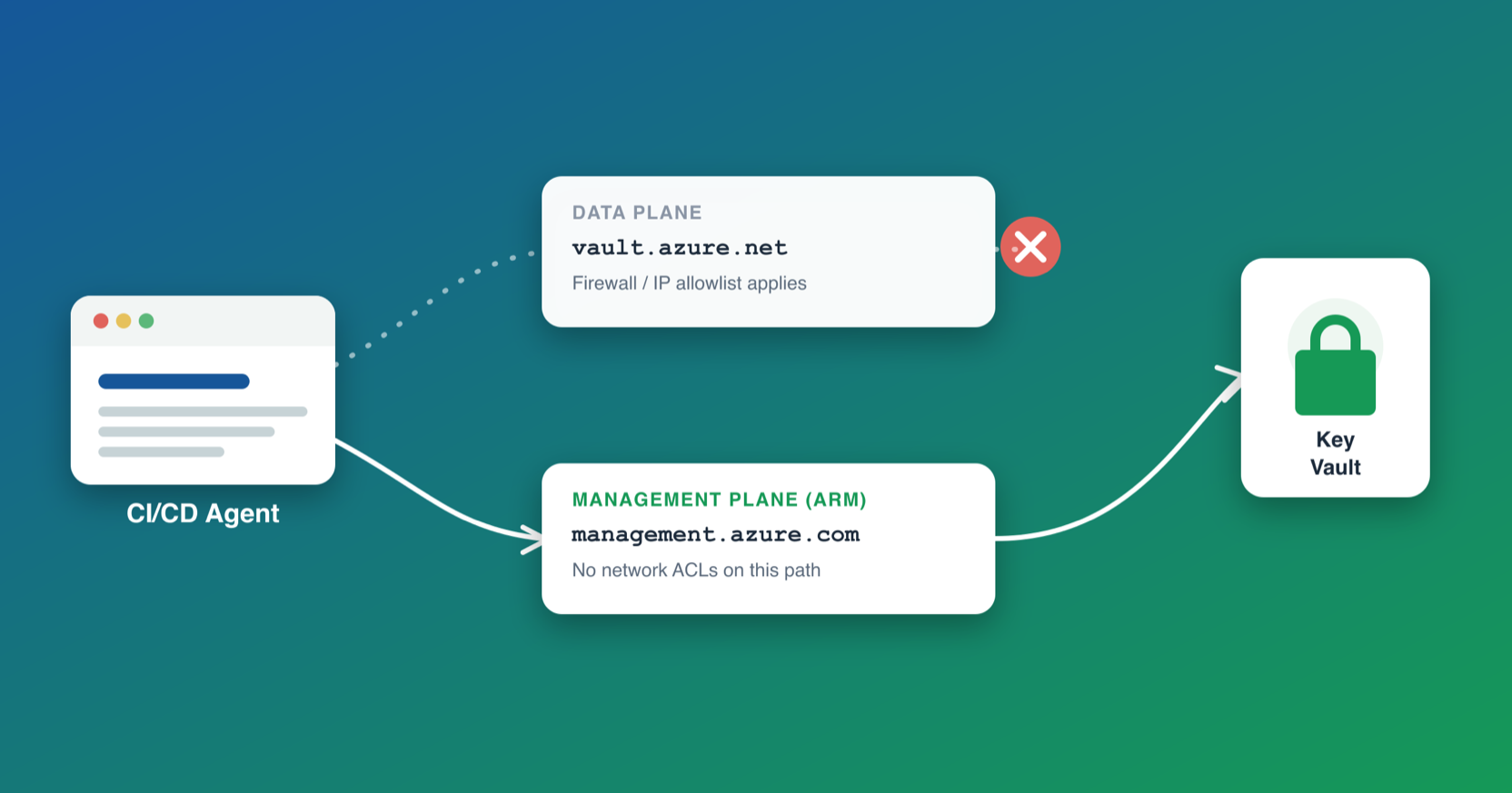
🔗Two planes, one firewall
Key Vault has two APIs sitting in front of the same data:
Data plane: {vault}.vault.azure.net. This is what az keyvault secret show/set, the Key Vault SDKs, and most tutorials use. Network ACLs (firewall rules, private endpoints, “selected networks”) apply here. If your agent’s IP isn’t allowed, it isn’t getting in.
Management plane: management.azure.com. This is Azure Resource Manager. ARM/Bicep deployments, and even a plain az rest call against the right URL, go through here. Network ACLs on the vault don’t apply to this path at all.
Secrets are actually exposed as a real ARM resource type, Microsoft.KeyVault/vaults/secrets, separate from the data-plane secret object. You can create, read, and update secrets by deploying that resource, no different from deploying a subnet or a storage account. Since ARM itself makes the call server-side, the vault’s firewall never sees a request from your agent’s IP, because there isn’t one.
Microsoft’s own Key Vault template deployment tutorial relies on exactly this, so it’s not some undocumented backdoor. It’s just rarely connected to the “my pipeline can’t reach my locked-down vault” problem, which is almost always answered with self-hosted agents inside the VNet or the flaky IP-allowlist dance instead.
🔗The pattern
Three touchpoints, none of which hit the data plane.
1. Check if a secret already exists, via az rest against the management plane:
SUB_ID=$(az account show --query id -o tsv)
VAULT_URI="https://management.azure.com/subscriptions/${SUB_ID}/resourceGroups/${RG}/providers/Microsoft.KeyVault/vaults/${VAULT_NAME}"

if az rest --method GET \
     --url "${VAULT_URI}/secrets/${SECRET_NAME}?api-version=2023-07-01" \
     --query id -o tsv 2>/dev/null | grep -q .; then
  echo "exists, skip bootstrap"
else
  echo "missing, generate and store"
fi
2. Create it, via an ARM/Bicep deployment of the secret resource, not az keyvault secret set:
resource secret 'Microsoft.KeyVault/vaults/secrets@2023-07-01' = {
  name: '${vaultName}/${secretName}'
  properties: {
    value: secretValue
  }
}
3. Consume it, via an ARM parameter file KV reference, resolved server-side when the dependent resource (VM, SQL, whatever needs the credential) deploys:
"adminPassword": {
  "reference": {
    "keyVault": { "id": "/subscriptions/.../vaults/{vaultName}" },
    "secretName": "{secretName}"
  }
}
The agent never calls vault.azure.net at any point in this flow. Bootstrap-once secrets (admin passwords, connection strings generated on first deploy) go in and come out entirely through ARM. Idempotency comes for free, since step 1 makes the whole thing safe to rerun. A secret only gets generated once, and every subsequent run just confirms it’s already there.
🔗The permission model to plan around
This works because ARM’s Microsoft.KeyVault/vaults/secrets write is authorized by ordinary Azure RBAC control-plane actions, the same kind that lets you deploy a storage account, and not by the vault’s own access policy or data-plane RBAC roles (Key Vault Secrets Officer, Key Vault Secrets User). It’s not the permission you’d instinctively reach for.
A security researcher found a related issue with the built-in Reader role in this writeup. Reader carries */read actions and no dataActions at all, yet it still lets you enumerate secret names, versions, and creation dates across every vault in scope through the same management-plane path. Microsoft’s response was that this is by design, since control-plane reads return metadata but never an object’s value.
For this pattern to work, whatever principal runs your pipeline needs Contributor, or a custom role with Microsoft.KeyVault/vaults/secrets/write, somewhere between the vault and wherever that role is scoped, not a data-plane role. Most deployment pipelines already have Contributor anyway, since they need it to create the VM, storage account, or whatever else the secret feeds into. That same grant doubles as write access to any secret in any vault under that scope, independent of the vault’s own access policy.
🔗Where this fits
Not a replacement for a real private-networking story if your threat model needs one. A VNet-joined self-hosted agent with a private endpoint is still the right call for ongoing, high-sensitivity data-plane access. But for the specific, common case of “pipeline needs to bootstrap or read a handful of secrets against a vault with networkDefaultAction: Deny, and I don’t want to run infrastructure just to make that possible,” routing through the control plane sidesteps the entire allowlist-and-pray problem instead of making it slightly less flaky.